The Rise of AI Browser Extensions: 2026 Trends and Predictions
AI browser extensions are the fastest-growing category in the Chrome Web Store. Explore the key trends shaping 2026 — from summarization and writing tools to in-browser AI processing, privacy-first design, and what comes next.
Three years ago, browser extensions were utilities. Ad blockers, password managers, tab organizers — small, single-purpose tools that quietly did their job in the background. Nobody thought of them as intelligent. Nobody expected them to think.
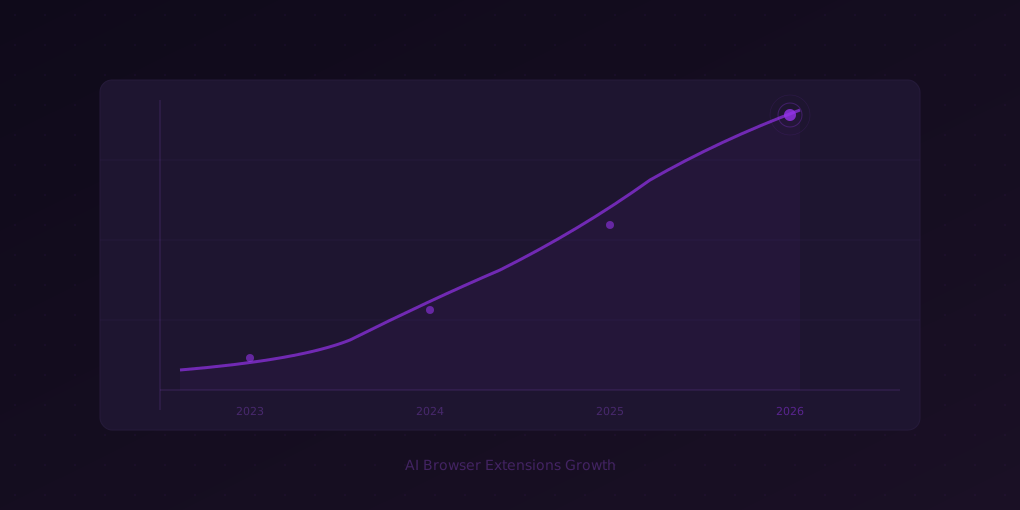
That has changed. AI-powered browser extensions are now the fastest-growing category in the Chrome Web Store, outpacing every other segment by a wide margin. In 2025, downloads of AI extensions grew 340% year-over-year. In early 2026, the trend is accelerating. The browser — not a standalone app, not a desktop client — has become the primary interface where people interact with artificial intelligence.
This is not a temporary spike driven by hype. It reflects a structural shift in how AI reaches users. The browser is where people already spend their time. AI extensions meet them there, eliminating the friction of switching contexts, opening new tabs, or copying text into a separate tool. The result is AI that feels less like a product and more like a capability woven into the web itself.
This article examines the forces driving that shift, the categories that are winning, and where the market is headed for the rest of 2026 and beyond.
1. From Utilities to Intelligence: How We Got Here
The First Wave: Simple Automation (2020–2023)
The earliest browser extensions solved mechanical problems. Grammarly checked spelling. LastPass filled passwords. uBlock Origin removed ads. These tools were rule-based — they followed predefined patterns and executed predictable actions. They were useful, but they were not smart.
The Second Wave: Cloud-Powered AI (2023–2025)
The launch of ChatGPT in late 2022 triggered a flood of AI-powered extensions. Most of them were thin wrappers around cloud APIs. They sent your text to a remote server, received a response, and displayed it in a sidebar or popup. The intelligence lived on someone else’s infrastructure. The extension was just a relay.
This model worked, but it had limitations. Latency was noticeable. Privacy was a concern — every keystroke, every URL, every document was transmitted to a third party. And the experience was generic. The AI did not understand the specific context of what you were looking at in the browser. It just processed whatever text you sent it.
The Third Wave: Context-Aware, In-Browser AI (2025–Present)
The current wave is different. Modern AI extensions understand the page you are on. They read the DOM, parse the document structure, identify the main content, and deliver results that are specific to what you are actually doing. They are not generic chatbots in a sidebar — they are intelligent layers that augment the web page itself.
Tools like 5MinRead exemplify this approach. Instead of asking you to copy an article into a chat window, it reads the page directly, identifies the content worth summarizing, and overlays highlights and summaries on top of the original text. The AI is not beside the page — it is inside it.
This contextual awareness is the defining characteristic of the third wave, and it is what separates genuine AI extensions from glorified API wrappers.
2. The Categories That Are Winning
Summarization and Reading Tools
The largest and most competitive category. The average knowledge worker encounters more written content in a day than they can reasonably process. AI summarization extensions address this directly by compressing articles, reports, PDFs, and video transcripts into structured summaries.
What distinguishes the leaders in this space is not just the ability to summarize — any LLM can produce a paragraph — but how they handle format, customization, and context.
5MinRead, for example, offers 21 built-in summary presets (Takeaways, Q&A, Critical Review, Study Guide, and more) plus a community marketplace of additional formats. Users do not get a one-size-fits-all summary. They get output shaped to match how they intend to use the information. A student preparing for an exam needs a different format than a product manager scanning competitor announcements.
The reading time badge — a small indicator on the extension icon that shows estimated reading time before you even click — represents another trend: passive intelligence. The extension provides value without requiring any action from the user.
Writing Assistants
The second-largest category covers everything from grammar correction to full content generation. Extensions like Jasper, Writesonic, and various GPT-based tools offer in-line writing suggestions, tone adjustment, and translation.
The trend here is moving away from “write it for me” toward “help me write better.” Users have become more sophisticated. They want AI that enhances their voice rather than replacing it. Extensions that offer contextual suggestions — understanding whether you are writing an email, a report, or a social media post — are outperforming generic text generators.
Research and Knowledge Management
A newer category that is growing rapidly. These extensions help users collect, organize, and synthesize information from multiple sources. Instead of treating each web page as an isolated unit, they build connections across everything you read.
5MinRead’s Research Mode is a strong example. Users can save multiple sources into a project, then ask the AI to synthesize findings, identify contradictions, and generate structured outlines. This goes beyond summarization into genuine knowledge work.
The browser is uniquely suited for this kind of tool because research happens in the browser. Bookmarks, tabs, history — the raw material of research is already there. Extensions that tap into this context have a natural advantage over standalone research apps.
Translation and Language Tools
Real-time translation extensions have been around for years, but AI has dramatically improved their quality. Modern tools like DeepL’s extension and Google Translate now handle idiomatic expressions, technical terminology, and contextual nuance far better than their predecessors.
The emerging trend is bilingual augmentation — extensions that do not just translate the page but overlay translations alongside the original text, allowing users to read in both languages simultaneously. This serves language learners and professionals who work across languages.
Coding and Developer Tools
AI coding assistants have moved into the browser. Extensions that provide code explanations, bug detection, and documentation lookups directly on GitHub, Stack Overflow, and documentation sites are gaining traction among developers.
The key innovation is site-specific awareness. These extensions understand that a code block on GitHub is different from a code snippet in a tutorial, and they adjust their behavior accordingly.
3. The Browser as the New Operating System
A deeper trend underlies all of these categories: the browser is becoming the primary computing environment.
Consider the daily workflow of a typical knowledge worker. Email is in the browser. Documents are in the browser. Communication tools, project management, analytics dashboards, research — all in the browser. The desktop is increasingly just a container for Chrome, Firefox, or Edge.
This makes the browser the natural platform for AI integration. Extensions have direct access to the content users interact with, without requiring screen sharing, API integrations, or manual data transfer. They operate at the point of action.
Google has recognized this with its push toward built-in AI capabilities in Chrome. Microsoft is embedding Copilot deeper into Edge. But extensions have an advantage that platform-level AI does not: specialization. A general-purpose AI assistant built into the browser tries to be everything to everyone. An extension like 5MinRead does one thing — summarization and research — and does it exceptionally well.
The market is large enough for both approaches to coexist. Platform AI will handle broad, low-specificity tasks. Extensions will own the verticals where depth, customization, and domain expertise matter.
4. Privacy: The Defining Battleground
If there is a single issue that will determine which AI extensions survive and which do not, it is privacy.
The Problem with Cloud-First AI
Most AI extensions send user data to external servers for processing. This creates several concerns:
- Data exposure: Every article you read, every email you compose, every document you summarize is transmitted to a third party.
- Compliance risk: Organizations subject to GDPR, HIPAA, or industry-specific regulations cannot use extensions that transmit sensitive content to unaudited cloud services.
- Trust erosion: High-profile data breaches and AI training controversies have made users more cautious about what data they share.
The Shift Toward Local Processing
The most significant technical trend in 2026 is the move toward on-device AI processing. WebGPU and WebAssembly have matured to the point where small-to-medium language models can run directly in the browser, without sending data to any server.
This is still early. On-device models are smaller and less capable than cloud-based ones. But for many tasks — text classification, basic summarization, entity extraction, language detection — they are good enough. And they offer absolute privacy: the data never leaves the user’s machine.
The winning strategy for extensions in 2026 is hybrid: use on-device models for privacy-sensitive tasks and lightweight operations, and offer cloud-based processing as an opt-in for tasks that require larger models.
Permissions and Transparency
Users are also paying more attention to extension permissions. Extensions that request broad permissions — access to all sites, reading browsing history, modifying page content — face higher scrutiny. The extensions that win trust are the ones that request minimal permissions and clearly explain why each permission is needed.
Chrome’s Manifest V3, despite its controversies, has pushed the ecosystem toward more granular permission models. Extensions that embrace this transparency will have a competitive advantage.
5. Key Trends Shaping the Rest of 2026
Trend 1: Hyper-Personalization
Generic AI output is becoming a commodity. The extensions that stand out are the ones that learn user preferences over time. What format do you prefer for summaries? What level of detail? What topics are you most interested in?
Personalization in AI extensions is moving beyond simple settings. Expect to see extensions that adapt their behavior based on usage patterns — automatically selecting the right summary format for a research paper versus a news article, adjusting verbosity based on the time of day, and surfacing the most relevant features based on the user’s workflow.
Trend 2: Cross-Browser and Cross-Device Sync
The extension ecosystem has historically been fragmented. Chrome extensions do not work in Firefox. Safari has its own API. This is changing.
Web Extension APIs are converging across browsers. Extensions built for Chrome can be ported to Firefox and Edge with minimal effort. Safari’s support for Web Extensions has improved significantly.
The next frontier is cross-device sync. Users want their settings, history, and preferences to follow them across their laptop, tablet, and phone. Extensions that solve this problem — syncing AI preferences and saved results across devices — will have a significant retention advantage.
Trend 3: Deeper Integration with Web Applications
Current AI extensions operate as overlays on top of web pages. The next step is deeper integration with the web applications themselves.
Imagine an AI extension that integrates with your project management tool to automatically summarize meeting notes and create tasks. Or one that connects to your CRM to summarize customer communications and surface key insights. Extensions are starting to move from passive readers of web content to active participants in web-based workflows.
Trend 4: Collaborative AI
Most AI extensions today are single-user tools. You summarize an article for yourself. You generate text for your own use. The emerging trend is collaborative AI — extensions that allow teams to share AI-generated outputs, annotate them together, and build shared knowledge bases.
Research teams, newsrooms, and analyst groups are early adopters of this pattern. Extensions that support shared workspaces, team presets, and collaborative annotation will capture the growing market for team-based AI tools.
Trend 5: Offline Capabilities
Reliable internet access is not universal, even in 2026. Extensions that can operate offline — using cached models and locally stored data — serve a broader audience and provide a more resilient experience.
This ties into the on-device processing trend. As browser-based AI models become more capable, offline functionality becomes feasible for an increasing range of tasks. An extension that can summarize a previously loaded article or check grammar without an internet connection delivers value that cloud-only tools cannot match.
6. What Users Should Look For
If you are evaluating AI browser extensions — whether for personal use or organizational deployment — here are the criteria that matter most in 2026:
Privacy and Data Handling
- Does the extension process data locally, in the cloud, or both?
- What data is stored, and where?
- Is the extension compliant with relevant regulations (GDPR, CCPA)?
- What permissions does it request, and are they justified?
Quality of Output
- Does the extension offer customization options (summary formats, tone, length)?
- Is the AI output accurate and relevant to the specific content?
- Does it handle different content types (articles, videos, PDFs) well?
Performance and Reliability
- How fast does the extension respond?
- Does it slow down the browser or interfere with page performance?
- Is it reliable across different websites and content types?
Ecosystem and Integration
- Does the extension work across browsers?
- Does it sync settings and data across devices?
- Does it integrate with other tools in your workflow?
Pricing and Value
- Is there a meaningful free tier?
- Do paid plans offer genuine additional value?
- Is the pricing transparent and predictable?
7. Predictions for 2027 and Beyond
Looking further ahead, several developments are likely to reshape the AI extension landscape:
AI extensions will become AI agents. Instead of responding to user commands, extensions will proactively identify opportunities to help. They will notice when you are reading a long document and offer a summary without being asked. They will detect when you are researching a topic and automatically collect relevant sources.
Browser vendors will build AI extension frameworks. Chrome, Firefox, and Safari will offer dedicated APIs for AI extensions, including standardized access to on-device models, permission frameworks for AI-specific capabilities, and marketplace features that highlight AI-powered tools.
Enterprise adoption will accelerate. Organizations will deploy AI extensions as standard productivity tools, managed through enterprise extension policies. Extensions that offer admin controls, usage analytics, and compliance features will capture this market.
Consolidation will happen. The current market has thousands of AI extensions, many of which offer similar capabilities. By 2027, users will consolidate around a smaller number of trusted, full-featured tools. Extensions that cover multiple use cases — summarization, research, writing, translation — within a single install will win over collections of single-purpose tools.
The line between extension and application will blur. AI extensions will become so capable that they rival standalone applications. The extension format — lightweight, always available, context-aware — will prove to be a superior delivery mechanism for many AI use cases.
Conclusion
The rise of AI browser extensions is not a trend — it is a platform shift. The browser has become the operating system of the modern knowledge worker, and AI extensions are becoming the applications that run on it.
The winners in this space will be the tools that combine deep contextual awareness with strong privacy practices, genuine personalization, and output quality that justifies the trust users place in them. Tools like 5MinRead, which treat the browser as a first-class AI platform rather than a thin client for cloud APIs, point toward where the entire category is heading.
If you work with information — and in 2026, nearly everyone does — AI browser extensions are no longer optional tools. They are essential infrastructure for staying competitive in a world where the volume of information grows faster than anyone’s ability to process it.
The question is not whether to adopt AI extensions. It is which ones deserve a permanent place on your toolbar.
Ready to experience what a well-designed AI extension can do? Try 5MinRead — summarize any article, video, or PDF in seconds, with 21 built-in formats and support for 15 languages.